Posts

Showing posts with the label security

Asus Chromebook C201

One of the many things that I paid attention to as I walked the halls of Defcon nearly a month ago was the devices people used for the capture-the-flag (CTF) events. During my first walk around the contest area I noticed many people sat against walls or such with macbooks. On later passes I started taking note of the devices that other people were using and a common one was the Asus C201 chromebook. Chromebooks are basically low-spec linux laptops designed around the use of Google Chrome. Though like many linux devices once you gain access to a terminal you often have free reign to alter the system and gain access to powerful command line tools. About a week and a half ago I picked up an Asus C201 for about $250 CAD. I will talk about what my typical use case is, what I wanted out of the C201, what my experience was, and a walk-through of how I set mine up to meet my use case. UPDATE:   Sarah Jamie Lewis wrote a thread on twitter adding her 2.5 years of experience to th...

You Don't Understand VPNs

Image
Technology is created to solve a problem. All technology has been a response to a perceived problem that exists in the world. Then, a bunch of nerds (engineers) got together and worked out a solution that addresses the problem in their use case. Any time that you pick up a piece of technology you should ask yourself what problems it was designed to solve from the viewpoint of the people who were likely to have made it. I am currently a little frustrated because people are demonstrating that they still don't understand what a Virtual Private Network (VPN) is for. So I am going to take some time to explain what a VPN was designed for, what problems it solves, and what it is not designed to do and how it doesn't solve those problems. The Problem In The Past, a Business decided to open a second office on the other side of town. They wanted to share their telephones since they had their telephone system all hooked up in their first office. The company made a decision to conn...

BlackHatUSA 2017 Keynote: Alex Stamos

Image
You have probably seen the twitter posts about the lasers and smoke machines on display at BlackHatUSA's Keynote speech on Wednesday. If you have not then I can give you the very quick run-down on that: Last-gen/old hackers, who are very anti-conformist and anti-corporate, turned their noses up because BlackHatUSA's keynote speech showed how much bank they made. Holla holla get dolla And why shouldn't they? The Briefings Pass, that would get you into all of the talks, runs for $2095 USD if you ordered before May 10th, and $2795 USD if you bought a ticket at the door. Trainings Passes were also expensive with additional costs for workshops you attended. Jeff Moss, the founder of BlackHatUSA and DEF CON, admitted that BlackHatUSA is a conference aimed at professionals and is premium-priced for large corporations because DEF CON's low barrier to entry made it harder for employees to sell to their bosses. While many old-school hackers stopped paying attention the m...

Usable Security Tools

There are a lot of useless security tools and applications. Their use cases are specific and might not match your threat model. They are complicated and create hurdles that turn away inexperienced users. There are a lot of good security tools that are not usable. If someone can't pick up your Good, usable security tools need to enforce consent, be widely applicable, and be easy to set up and easy to use. When I hear of a good tool I usually leave it to simmer and let other people test them, and if I hear good things then I test them out myself. I've found some excellent and usable tools that I'd love to share. Tools Discussed Boxcryptor Classic (Free) KeePass (Free) Mooltipass ($80 USD) YubiKey U2F ($18 USD, $24 CAD) Secure The Cloud: Boxcryptor Classic Annual Reminder: Use KeePass Use BoxCryptor — DEY! (@ronindey) July 11, 2017 I had never heard of BoxCryptor before so I did not know what it did or what it was for. Turns out it creates a folder in y...

Windows Management Interface (WMI) Filtering for Group Policy Objects

During my recent work with a local law firm overhauling their network and designing a new Active Directory (AD) domain structure I have learned some tricks. One is WMI Filtering for applying an entire Group Policy Object (GPO). Windows Management Interface (WMI) Filtering is a feature in the Group Policy Management Console (GPMC) on Windows Server operating systems that let you create conditional logic as to whether or not a GPO applies to a specific computer within it's assigned Operational Unit (OU). Here's an example filter taken from the Security Baseline for Windows 10 (Draft) : Internet Explorer 11.mof instance of MSFT_SomFilter { Author = "Administrator@JST4KXS.local"; ChangeDate = "20131215210840.077000-000"; CreationDate = "20131031204931.789000-000"; Description = "Applies Internet Explorer 11 Settings"; Domain = "JST4KXS.local"; ID = "{F78EB5A2-B8C0-49FC-BB29-86DD2D3E0B15}"; ...

Securing a Law Firm, part 1: Securing Chrome

Image
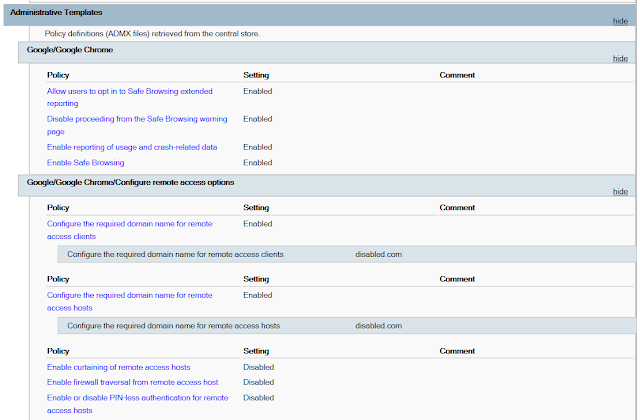
On a snowy day, late in December of 2016 I sat in a corner office of a local law firm with the firm's IT manager discussing the hottest topic of the week - ransomware. After a law firm down the road had been hit by a ransomware attack the partners were afraid. They were asking a lot of questions for which the IT manager had serviceable answers. I had my own questions in preparation for my practicum beginning in the new year. Scribbled in various notebooks and loose scraps of paper in my bag laid the anatomy of the day's typical ransomware attack. My previous months had been spent picking up the tools of the infosec trade from the sidelines of Twitter. I wanted to see how much of it I could use. Over lunch I probed the IT Manager about their threat model, what they were prepared for, and their recovery plans for when they failed. I approached them because I knew their environment wasn't prepared for a modern attack. My goal during the meeting was to see just how bad...